Embed Components Append Semicolon After </iframe> on Save
Issue:
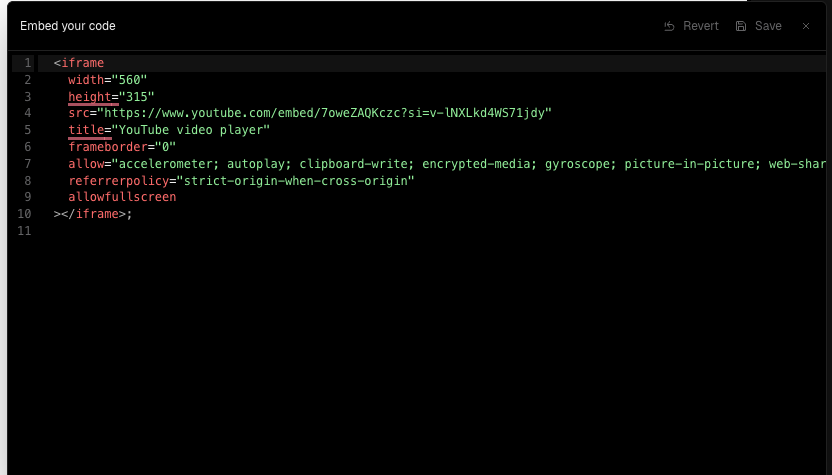
When saving an Embed component that contains an <iframe>, a stray semicolon (;) is appended after the closing </iframe> tag. This character renders visually on the site.
However, the bug only occurs when the embed contains no HTML comments. Adding a comment — either before or after the iframe — prevents the issue.
Example (broken):
<iframe src="..." width="600" height="400"></iframe>Published Output:
<iframe src="..." width="600" height="400"></iframe>;Example (working):
<!-- some comment -->
<iframe src="..." width="600" height="400"></iframe>
or
 <iframe src="..." width="600" height="400"></iframe>
<!-- some comment -->
Expected Behavior:
The embed should not append any additional characters unless explicitly added by the user.
Actual Behavior:
A semicolon is injected after the closing tag — but only when there are no comments in the markup.
Steps to Reproduce:
Add an Embed component with only an
<iframe>Save and publish
Observe semicolon appearing after the iframe
Workarounds:
Add a dummy comment anywhere in the embed content (before or after the iframe)
Impact:
Medium – breaks visual polish and introduces confusing behavior for users embedding external content.
Notes:
This may be due to a parser quirk or a serialization artifact that gets bypassed when the content includes an HTML comment.
Suggested Fix:
Sanitize embed output on save to strip unintended trailing characters. Investigate parser behavior for content without comments.
Log in to comment and vote
No comments yet
Be the first to share your thoughts.